Plan useful chapters for a finished video
Chapters are a map of the finished edit. A useful label tells someone what they can find in a section; its timestamp takes them to the beginning of that task. Start with what changes for the viewer, then check the formatting.
Try it as you read: download the blank worksheet and record the timestamps while reviewing your final edit in your video editor.
Start from the final edit
Write the working title and full duration at the top of your worksheet. Review the finished video in your own editor, or watch it on its original YouTube page. Enter each start time manually; this guide does not load or analyze the video.
Use a finished on-demand video. Live DVR timestamps and an edit that is still changing do not provide a stable map. If you remove a section after planning, revisit every later boundary instead of assuming the old times still work.
Find the change in task
Watch for the point where the viewer moves to another job: choosing equipment, assembling it, adjusting the frame, or checking the result. Do not divide the runtime into equal intervals just to make a neat list. A change of camera angle may support the same task and need no new chapter.
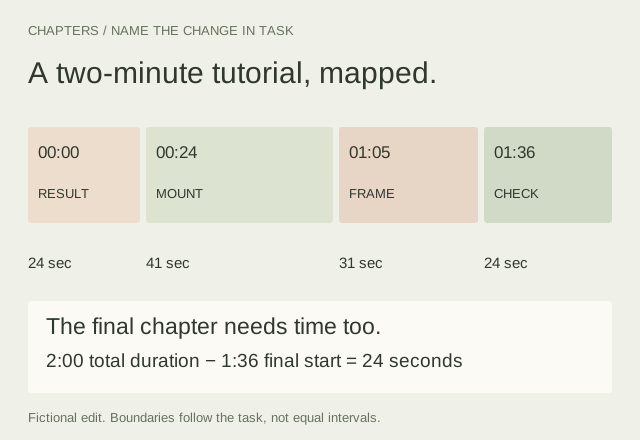
In our fictional desk-camera tutorial, the opening shows the completed setup and its limitations. The next section begins when the mounting decision is introduced, before the hands start attaching it. That context belongs with the procedure.
Work through the two-minute example
00:00 Finished setup and limitations
00:24 Choose and attach the mount
01:05 Frame the work surface
01:36 Check stability and clearance
The section lengths are 24, 41, 31 and 24 seconds. The final duration matters: 2:00 minus 1:36 leaves 24 seconds. If the same video ended at 1:42, the final chapter would have only six seconds, so that boundary would need reconsideration.
“Check stability and clearance” explains the task. “The secret nobody tells you” withholds the information a navigation label should provide. Keep the title accurate even if a more dramatic phrase sounds appealing.
Separate format checks from publishing eligibility
YouTube documents a first timestamp of 00:00, at least three timestamps in ascending order, and a minimum chapter length of 10 seconds. Check these conditions against the full duration yourself. Correct formatting alone does not guarantee chapter availability. Review YouTube’s chapter instructions and eligibility notes before publishing.
A warning about a short interval is a prompt to review the structure. You might combine two small related steps into one section. Avoid shifting a boundary away from the actual task just to make the check pass.
Preview the boundary before exporting
In your video editor, seek to each proposed boundary and play a few seconds before and after it. The opening of a section should give enough context to understand what follows. Write a whole-second start, give it a descriptive name and keep the list in chronological order.
If you start from an existing list, keep a copy before editing and check the duration separately. A list copied from a description cannot establish where the video ends.
Keep a draft and check the published result
Save the worksheet with your project files. Copy the plain-text chapter list into the video description yourself. YTGrid does not connect to your channel or publish changes.
After saving in Studio, inspect the actual video and follow several chapter links. If chapters are unavailable, consult YouTube’s eligibility guidance rather than repeatedly renaming sections. If the edit changes, update both your worksheet and the published list.
Plan the sequence earlier with the Shot List Planner, and review the final dialogue in the Caption Timing Editor.