Turn video observations into a research notebook
“This opening feels stronger” is a starting impression. A useful research note names the moment, describes what happened and records what you still cannot conclude. This workflow turns a comparison session into a small body of evidence you can revisit.
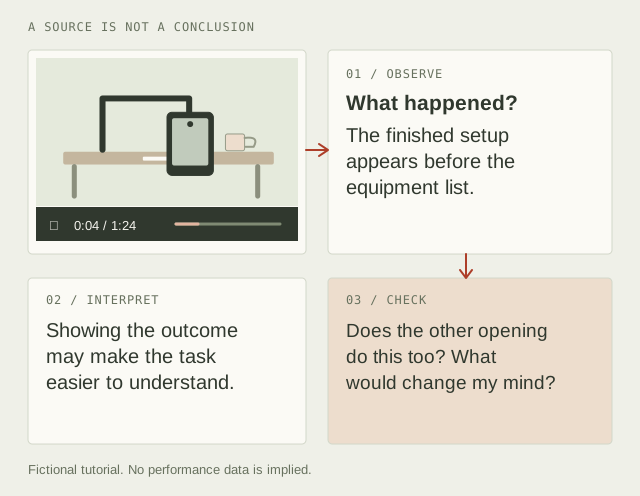
Your output: a question, two or three source links, a short observation log and one next action. Use the blank Markdown worksheet in your own text editor. The example below is fictional; no audience results or real creator performance are claimed.
1. Ask a question that the videos can answer
“Why did this go viral?” usually requires information you do not have. “How does each opening establish the finished result?” is observable. The narrower question keeps public evidence and private analytics separate.
Write down your selection rule before choosing examples. For a tutorial comparison, use videos that teach the same task to a similar audience. Record useful differences such as format, language or intended skill level. Do not quietly discard the example that contradicts your preferred explanation.
2. Record the source before interpreting it
Open each video on its original YouTube page and record its source link in your worksheet. Give it a label that explains its role in the comparison. Watch one at a time, pause at a relevant moment and manually record the timestamp with your observation. The source link and time make it possible to inspect the passage later.
Describe what is visible or audible in your own words. “The finished camera angle is shown before the equipment list” is an observation. “The creator understands the algorithm” is an interpretation with no direct evidence in that moment. Preserve that distinction even when the interpretation seems obvious.
3. Work through a small example
Imagine two invented tutorials about mounting a phone above a desk. Both promise an overhead filming setup. The following is a demonstration of the method, not a report on actual videos.
| Fictional moment | Observation | Interpretation to check |
|---|---|---|
| Tutorial A, opening | The first shot shows the finished overhead frame. Mounting hardware appears next. | The viewer may understand the desired outcome before the setup instructions begin. |
| Tutorial B, opening | An equipment list appears before a finished frame is shown. | This may suit viewers who already know the outcome and want to check what they need. |
| Tutorial A, later | The desk shakes during a typing demonstration. | The opening's clean frame did not establish stability. A useful comparison should include that trade-off. |
The third row changes the research. A visually clear opening is not evidence that the finished setup is suitable. The next action could be to show both the final framing and a stability check in your own tutorial, then ask target viewers whether they understand the trade-off. It would not be justified to conclude that Tutorial A has better retention.
4. Treat AI output as a proposed note
In its January 2026 priorities letter, YouTube describes AI as a growing part of creation while discussing low-quality AI content and creator control. Our practical inference is that a traceable observation is increasingly useful when summaries and variants are easy to generate. That is the rationale for this workflow, not a claim about an AdSense requirement.
If you use an assistant to organise notes, give it your observations and ask it to preserve their source IDs, separate direct evidence from inference, and list unsupported conclusions. Then check the draft against the source yourself. A fluent paragraph, a plausible timestamp or agreement between two assistants does not verify a claim.
YTGrid does not transcribe videos or send your notes to an AI service. If you copy notes into another service, that service's data practices apply. Keep private channel analytics and confidential client information out of a prompt unless you have a reason and permission to share them.
5. Mark the evidence status honestly
- Unverified: a lead, memory, generated suggestion or claim you have not checked.
- Observed: you checked that the moment or statement occurs in this source. This does not mean that the speaker's claim is true.
- Corroborated: you recorded independent evidence supporting the claim. Explain that evidence in the note; several channels repeating one source may still be one source.
These are your labels, not an independent certification. A source can establish that someone made a statement without establishing that the statement is accurate.
6. End with a decision and a limit
Save a dated copy of the Markdown worksheet to share or revisit the reasoning. State one action and one condition that would change your mind. For the fictional tutorial: “Show the finished frame and a stability check early; revise if target viewers still cannot tell whether the mount fits their desk.”
For packaging ideas, carry the hypothesis into the Test Planner. For close listening, revisit the relevant passage on its original page. Public observations cannot expose another channel's retention curve. YouTube's audience-retention documentation explains the report available for your own eligible videos.
What can go wrong?
Live sources change. A timestamp on a live DVR window may not map to the later archive. Record the date and the spoken context in the observation. Sources disappear. Keep a careful paraphrase of the relevant point and its original link; an export is not a video backup. Selection is biased. Include a counterexample and do not generalise from two hand-picked videos to a whole audience.
The result should be a notebook another person can challenge, not a score that disguises your uncertainty.