Packaging / A worked method
Compare your thumbnail drafts at small sizes
A large canvas can hide a small-screen problem. Use three of your own drafts to isolate what a viewer can actually recognize, then leave the review with one specific revision.
Start with one fixed promise
Our fictional example is an overhead filming tutorial titled “Build a steady phone rig with one desk clamp.” The viewer wants to understand whether the setup is simple enough to copy. Every thumbnail draft should support that same promise. Changing the title and the image at once would make the source of any difference harder to explain.
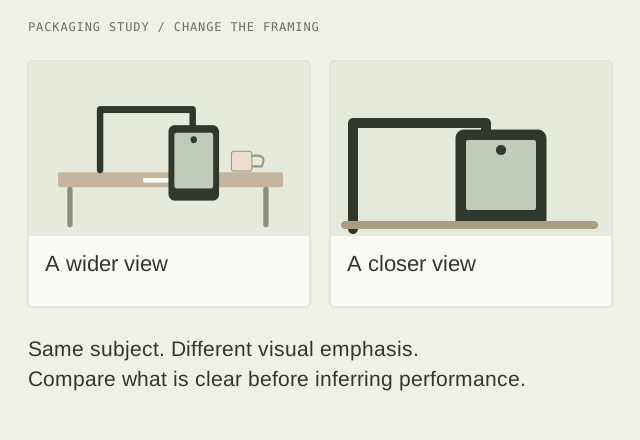
Draft A shows the whole desk. Draft B crops closer to the phone and clamp. Draft C keeps the close crop and adds a short text label. These are illustrative alternatives, with no audience results attached.
Review at a small size first
- Open Thumbnail Compare and enter the working title.
- Select your draft images in slots A, B and C. Use exports from your own editor, or artwork you have permission to use.
- Keep the preview at 160 pixels. Look away, then return and name the first object you recognize in each card.
- Switch to 320 pixels to inspect the detail that disappeared. A file’s resolution and the size of the subject inside it are different issues.
The preview fits the file inside a 16:9 frame without cropping it. A file with another aspect ratio will show surrounding space; that is a cue to check the intended publishing surface in your editor. This is a controlled preview, not a pixel-exact reproduction of every YouTube surface.
Write evidence that leads to a revision
For each draft, record what reads clearly and what causes confusion. Avoid a vague note such as “B is better.” Describe a visible difference and connect it to the promise:
- A, observation: the desk is recognizable, but the clamp merges into the dark edge. Next change: reduce empty desk space and separate the clamp from the background.
- B, observation: the phone and clamp read as one setup at the small size. Next change: check whether the connection point stays visible in the final crop.
- C, observation: the label repeats words already in the title and covers the clamp arm. Next change: remove the label and compare again.
These notes are design judgments. They do not show which draft will earn more clicks or watch time. A useful review can reject an unclear draft without claiming to predict audience behavior.
Export the brief and test one idea
Export review notes to keep the working title, filenames, pixel dimensions and proposed changes together. Images are not included. The browser does not retain them after you leave, so keep the original files in your project folder.
Use the Packaging Test Planner to turn the revision into a hypothesis: “Giving the clamp more space may make the setup easier to recognize.” Record the variable you changed and the result you would consider useful. Follow the current options available in your own YouTube Studio for any audience test.
Scope and sources
The comparison method and desk-rig example are YTGrid’s editorial work. We do not download other creators’ artwork, inspect their private analytics or infer performance from public thumbnails. For platform testing features, see YouTube’s testing documentation.